For the Jaecoo J5 head unit
A small app for your J5 screen.
Hub Lite is a small, separate app for the Jaecoo J5 EV head unit. It installs next to J5 Hub. It has three pages: tyres, battery and karaoke.
id.rumah.j5lite
Android 9+, arm64
VERSION 1.0.1Three pages
Each page does one job.
-
Tyres
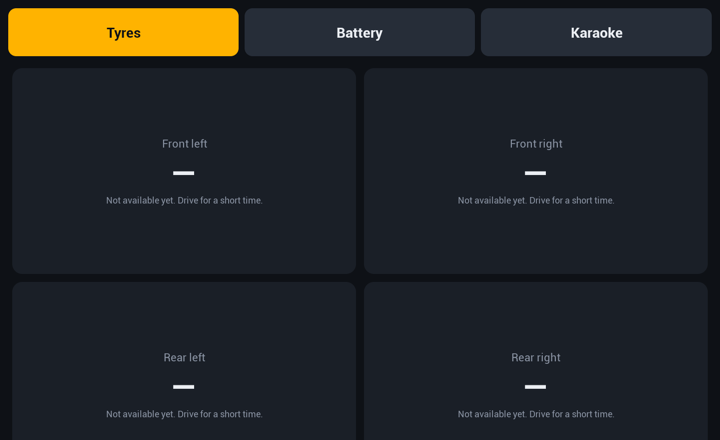
Shows TPMS pressure, temperature and warning of each tyre.
The pressure scale is not confirmed yet, so the app shows raw values. A parked car shows "—".
-
Battery
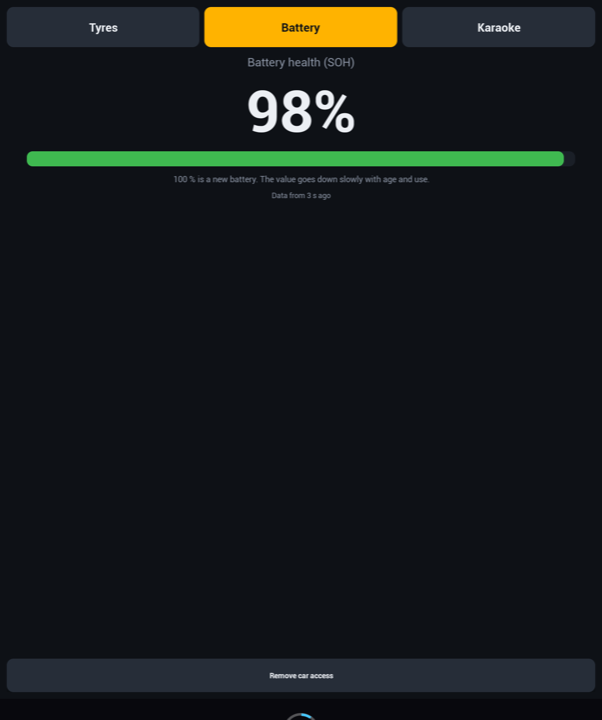
Shows the high-voltage battery state of health (SOH), for example 98 %.
The button "Remove car access" on this page removes the car key.
-
Karaoke
Plays local songs from a "Karaoke" folder on a USB drive.
Synced lyrics come from a .lrc file next to the song. If there is no .lrc file, the app uses free lyrics from LRCLIB. Two buttons move the lyrics 0.5 s sooner or later.
The YouTube karaoke search opens the video in NewPipe. This works only when the car is parked. GPS above 8 km/h locks it.
Real screenshots from a Jaecoo J5, 16 November 2026.
Why Lite
Little code, little memory.
- APK size
- 3.8 MB
- library (dadb)
- 1
- background services
- 0
- memory on the car
- 30–40 MB
- No background service.
- No notifications.
- One library only: dadb.
- About 30 to 40 MB of memory on the car. Measured: 29 to 38 MB PSS.
- It installs next to J5 Hub.
Download Hub Lite
Hub Lite 1.0.1
- Version
- 1.0.1 (versionCode 2)
- Size
- 3.8 MB (3,813,506 bytes)
- Package
- id.rumah.j5lite
- Needs
- Android 9+ (minSdk 28), arm64
SHA-256
52a9f153f560b4eaa136bf0c867d5e07ef61f335710633a448269c1218b51908
Check the SHA-256 after the download. If the value is not the same, do not install the file.
On Mac or Linux, run the first command. On Windows, use the second command.
shasum -a 256 hub-lite-1.0.1.apk
certutil -hashfile hub-lite-1.0.1.apk SHA256
Install with ADB
Use a laptop on the same Wi-Fi as the car.
Download the APK on the laptop. Check the SHA-256 as shown above.
Install ADB on the laptop. Connect the laptop to the same Wi-Fi as the car.
Connect to the car. Replace <car-ip> with the IP address of the car.
adb connect <car-ip>:5555
Install the app from the folder that holds the APK file.
adb install -r hub-lite-1.0.1.apk
Open Hub Lite on the car. Tap "Allow car data", tick "Always allow", then tap Allow.
Other way: use the J5 Bridge tools at j5.lingkunganplus.com/install/
Questions
How does Hub Lite get car data?
You approve one time on the car. Tap "Allow car data", tick "Always allow", then tap Allow. A read-only script then reads the values. To stop access, tap "Remove car access" on the Battery page. This removes the key.
Why does the app show raw tyre values?
The pressure scale is not confirmed yet. The app shows raw values until the scale is confirmed. A parked car shows "—".
Where do I put songs and .lrc files?
Make a folder named "Karaoke" on a USB drive. Put the songs in that folder. For synced lyrics, put a .lrc file next to the song. With no .lrc file, the app uses free lyrics from LRCLIB.
Can I watch the video while I drive?
No. The YouTube karaoke search opens the video in NewPipe only when the car is parked. GPS above 8 km/h locks it.